<?xml version="1.0" encoding="ISO-8859-1"?>
<rdf:RDF xmlns:rdf="http://www.w3.org/1999/02/22-rdf-syntax-ns#" xmlns:ref="http://purl.org/rss/1.0/modules/reference/" xmlns:dc="http://purl.org/dc/elements/1.1/" xmlns="http://purl.org/rss/1.0/">
	<channel rdf:about="http://www.zealsoft.com/blog/rss.rdf">
		<title>Zeal SoftStudio Blog</title>
		<link>http://www.zealsoft.com/blog/index.php</link>
		<description><![CDATA[Copyright (c) 1997-2007, Zeal SoftStudio. All rights reserved.]]></description>
		<items>
			<rdf:Seq>
				<rdf:li resource="http://www.zealsoft.com/blog/index.php?entry=entry080322-054623" />
				<rdf:li resource="http://www.zealsoft.com/blog/index.php?entry=entry080315-031759" />
				<rdf:li resource="http://www.zealsoft.com/blog/index.php?entry=entry080216-070251" />
				<rdf:li resource="http://www.zealsoft.com/blog/index.php?entry=entry080213-075315" />
				<rdf:li resource="http://www.zealsoft.com/blog/index.php?entry=entry080212-050531" />
				<rdf:li resource="http://www.zealsoft.com/blog/index.php?entry=entry080209-203310" />
				<rdf:li resource="http://www.zealsoft.com/blog/index.php?entry=entry070312-085117" />
				<rdf:li resource="http://www.zealsoft.com/blog/index.php?entry=entry061203-065911" />
				<rdf:li resource="http://www.zealsoft.com/blog/index.php?entry=entry061115-170723" />
				<rdf:li resource="http://www.zealsoft.com/blog/index.php?entry=entry060826-101137" />
				<rdf:li resource="http://www.zealsoft.com/blog/index.php?entry=entry060809-072659" />
				<rdf:li resource="http://www.zealsoft.com/blog/index.php?entry=entry060729-014518" />
				<rdf:li resource="http://www.zealsoft.com/blog/index.php?entry=entry060720-082312" />
				<rdf:li resource="http://www.zealsoft.com/blog/index.php?entry=entry060715-055718" />
				<rdf:li resource="http://www.zealsoft.com/blog/index.php?entry=entry060707-204122" />
				<rdf:li resource="http://www.zealsoft.com/blog/index.php?entry=entry060505-045848" />
			</rdf:Seq>
		</items>
	</channel>
	<item rdf:about="http://www.zealsoft.com/blog/index.php?entry=entry080322-054623">
		<title>Shortcuts Map editorial award</title>
		<link>http://www.zealsoft.com/blog/index.php?entry=entry080322-054623</link>
		<description><![CDATA[Shortcuts Map receives 5 stars award from Best-software4u.<br /><br /><a href="http://www.best-software4u.com/download21725.html" target="_blank" ><img src="http://www.best-software4u.com/images/editor.jpg" width="200" height="56" border="0" alt="" /></a><br /><br />Shortcuts Map will help you to manage hotkeys assigned to shortcuts on the desktop or in the Start menu hierarchy. With the straightforward user interface, you can easily to change a hotkey or find an unused hotkey. ]]></description>
	</item>
	<item rdf:about="http://www.zealsoft.com/blog/index.php?entry=entry080315-031759">
		<title>FIX: CheckListBox ActiveX can&#039;t be registered</title>
		<link>http://www.zealsoft.com/blog/index.php?entry=entry080315-031759</link>
		<description><![CDATA[Our customers reported our CheckListBox ActiveX can&#039;t be registered under some systems. Now, this bug is fixed. In our evaluation version, sometimes setup program will install x64 edition of chklsb26.ocx into 32-bit system directories. We update our evaluation version to fix this bug. Because no other files are updated, we don&#039;t change the version number. This bug doesn&#039;t exist in registered version and upgrade version.<br /><br />Download update version of evaluation version from  <a href="http://www.zealsoft.com/checklistbox/chklsbev.zip" target="_blank" >here</a> .]]></description>
	</item>
	<item rdf:about="http://www.zealsoft.com/blog/index.php?entry=entry080216-070251">
		<title>NTPort Library has received a 5 Stars Rating at PCWin.com</title>
		<link>http://www.zealsoft.com/blog/index.php?entry=entry080216-070251</link>
		<description><![CDATA[<img src="http://pcwin.com/resources/award_L_5.jpg" width="126" height="36" border="0" alt="" id="img_float_left" /> This a new award for NTPort Library. Visit  <a href="http://pcwin.com/Software_Development/Components___Libraries/NTPort_Library/index.htm" target="_blank" >NTPort Library page at PCWin.com</a>.<br />]]></description>
	</item>
	<item rdf:about="http://www.zealsoft.com/blog/index.php?entry=entry080213-075315">
		<title>NTPort Library now supports Windows Vista!</title>
		<link>http://www.zealsoft.com/blog/index.php?entry=entry080213-075315</link>
		<description><![CDATA[We are excited to announce the new release of  <b>NTPort Library, version 2.8</b> .<br /><br />In this version, we officially support  <b>Windows Vista, both x86 and x64 version</b> . From <a href="http://www.zealsoft.com/blog/index.php?entry=entry060707-204122" target="_blank" >July 2006</a>, we worked on Windows Vista, and released beta versions to our registered users. We got valuable feedbacks from our testers. Now, I think it&#039;s the time to release it to all users. Two major updates,  <b>signed kernel driver and HTML Help(.chm format), </b>  are made for Windows Vista. A screen shot of PortTest sample running in  Windows Vista  is shown below.<br /><br /><a href="javascript:openpopup('/ntport/portscn.JPG',800,600,false);"><img src="/ntport/portscn.JPG" border="0" alt="" /></a> <br /><br />We also add<a href="http://www.zealsoft.com/blog/index.php?entry=entry061115-170723" target="_blank" >JBuilder 2007 &amp; Eclipse samples </a>  to this version. We will continue to develop more samples for our customers.<br /><br />Since last version, Microsoft and CodeGear have released their new development tools. We are registered partner of Microsoft and Technology Partner of CodeGear. Of course, we provide full support of  <b>Visual Studio 2008 </b>  and  <b>CodeGear RAD Studio 2007 </b>  in this version.<br /><br />Although x64 edition of Windows is not so popular as x86 edition, we continue to improve our x64 support. We rewrite the <b>merge module for  Windows Installer</b>, so that it can work with both 32-bit and 64-bit installer.<br /><br />A small feature is missing in this version. We removed Wise Installation System 8.0 sample. which is out-of-date.<br /><br />If you are a registered user, please go to  <a href="/upgrade/" target="_blank" >update page </a>  to download the upgrade version. If you are a new user, please go to  <a href="/ntport/download.html" target="_blank" >download page </a>  to get a full feature evaluation version.]]></description>
	</item>
	<item rdf:about="http://www.zealsoft.com/blog/index.php?entry=entry080212-050531">
		<title>Add NTPort Library path to Visual C++ 2005/2008 directories</title>
		<link>http://www.zealsoft.com/blog/index.php?entry=entry080212-050531</link>
		<description><![CDATA[The installer of NTPort Library will automatically add NTPort Library to Visual C++ 6.0/2002/2003&#039;s directories, so Visual C++ can easily find ntport.h and ntport.lib. <br /><br />But our installer won&#039;t do such things in Visual C++ 2005/2008. Because Visual C++ 2005/2008 stores such settings in two files, VCProjectEngine.dll.config and VCProjectEngine.Dll.Express.Config in &lt;Visual Studio directory&gt;\VC\vcpackages. Both files in XML format, so it&#039;s a bit difficult to modify both files in our installer written in NSIS. We recommend you to add NTPort Library manually using  <b>Tools -&gt; Options -&gt; Projects and Solutions -&gt; VC++ Directories</b> .]]></description>
	</item>
	<item rdf:about="http://www.zealsoft.com/blog/index.php?entry=entry080209-203310">
		<title>NTPort Library received 5 stars award</title>
		<link>http://www.zealsoft.com/blog/index.php?entry=entry080209-203310</link>
		<description><![CDATA[<img src="http://www.download25.com/media/awards/5stars.jpg" width="100" height="114" border="0" alt="" id="img_float_left" /> NTPort Library receives 5 stars award from Download25.com. See  <a href="http://www.download25.com/ntport-library-download.html" target="_blank" >NTPort Libary page</a>  at Downlod25.com. <br />]]></description>
	</item>
	<item rdf:about="http://www.zealsoft.com/blog/index.php?entry=entry070312-085117">
		<title>CheckListBox ActiveX 2.6 SP6 is released</title>
		<link>http://www.zealsoft.com/blog/index.php?entry=entry070312-085117</link>
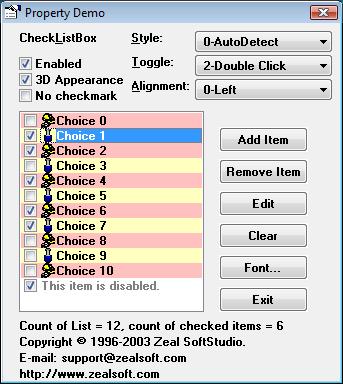
		<description><![CDATA[Today, we release CheckListBox ActiveX 2.6 SP6.<br /><br />In this version, we support Windows XP &amp; Vista theme. The checkmark will be automatically changed with the Windows theme. Following picture shows our control under Windows Vista.<br /><br /> <img src="images/chklsb_vista.jpg" width="343" height="384" border="0" alt="" /> <br /><br />We signed .ocx file with our certificate, so Internet Explorer won&#039;t pop up an unknown publisher warning dialog.<br /><br />We add x64 edition ActiveX into this version, but we don&#039;t know how many users will use it. If you require x64 edition, please let us know.<br /><br />Please download the evaluation version from  <a href="http://www.zealsoftstudio.com/checklistbox/download.html" target="_blank" >http://www.zealsoftstudio.com/checklist ... nload.html</a> . Registered users can download upgrade version from  <a href="http://www.zealsoft.com/upgrade/" target="_blank" >http://www.zealsoft.com/upgrade/</a> .]]></description>
	</item>
	<item rdf:about="http://www.zealsoft.com/blog/index.php?entry=entry061203-065911">
		<title>Dev-C++ Sample for MemAccess Library is available</title>
		<link>http://www.zealsoft.com/blog/index.php?entry=entry061203-065911</link>
		<description><![CDATA[Dev-C++ Sample for MemAccess Library is available for <a href="http://www.zealsoftstudio.com/memaccess/download.html" target="_blank" >download</a> now. This sample is used to demonstrate how to use MemAccess Library in  <a href="http://www.bloodshed.net/devcpp.html" target="_blank" >Dev-C++</a>. Dev-C++ is a full-featured integrated development environment (IDE). It uses  <a href="http://www.mingw.org/" target="_blank" >Mingw port of GCC (GNU Compiler Collection)</a>  as it&#039;s compiler.<br /><br />If you use memacc.h and memacc.lib included in MemAccess Library 1.4 with Dev-C++ 4, you will get some errors. In this Dev-C++ sample, we change the memacc.h to avoid errors with MinGW compiler. Another change is the import library, MemAcc.lib, which is created by Visual C++ 6.0 and can’t be used for Dev C++, so we create libmemacc.a as the import library. <br /><br />A console sample is also included in this package.<br /><br />If you find any problem, please feel free to contact us.]]></description>
	</item>
	<item rdf:about="http://www.zealsoft.com/blog/index.php?entry=entry061115-170723">
		<title>NTPort Library for JBuilder 2007 Samples</title>
		<link>http://www.zealsoft.com/blog/index.php?entry=entry061115-170723</link>
		<description><![CDATA[Now, NTPort Library for JBuilder 2007 Samples are available for  <a href="http://www.zealsoftstudio.com/ntport/ntjb2007.zip" target="_blank" >download</a>. <br /><br />From version 2.6, we supports JBuilder 2006 and previous version. JBuilder 2007 is a completely new version and built on the open source Eclipse platform. Our samples are fully tested with JBuilder 2007 and will be included in the next release of NTPort Library. <br /><br />Before install and run these samples, you must install an evaluation version or registration version of NTPort Library, which includes Java JNI DLL and other documents. If you don&#039;t have a copy of NTPort Library, please download an evaluation version from  <a href="http://www.zealsoftstudio.com/ntport/download.html" target="_blank" >here</a>.<br /><br /><a href="http://tp.codegear.com/ctprefer.aspx?partner_id=965&amp;product_id=26" target="_blank" ><img src="http://www.zealsoftstudio.com/images/jb2007logo_150.jpg" width="150" height="90" border="0" alt="" /></a>]]></description>
	</item>
	<item rdf:about="http://www.zealsoft.com/blog/index.php?entry=entry060826-101137">
		<title>We supports all Borland Turbo products.</title>
		<link>http://www.zealsoft.com/blog/index.php?entry=entry060826-101137</link>
		<description><![CDATA[Zeal SoftStudio announced that our flagship products, <a href="http://www.zealsoftstudio.com/ntport/" target="_blank" >NTPort Library </a>and <a href="http://www.zealsoftstudio.com/memaccess/" target="_blank" >MemAccess Library</a> will support all Borland Turbo products. As a Borland Technology Partner (BTP), we always provide best support to Borland Development tools, and our products will pass the test with Borland Development products before Borland release its products.<br /><br />The Turbo product set includes Turbo Delphi for Win32, Turbo Delphi for .NET Turbo C++ and Turbo C# Each version will be available in two editions: Turbo Explorer, a free downloadable version, and Turbo Professional, a version priced less than $500 which is designed to accept thousands of available third-party tools, components and plug-ins. All Turbo editions enable developers to rapidly build high performance GUI, Database, Web, and Web Services applications for Microsoft Windows. Turbo Delphi for .NET and Turbo C# support the Microsoft .NET and ASP.NET platforms. More information is available at <a href="http://www.turboexplorer.com" target="_blank" >http://www.turboexplorer.com</a>.<br /><br /><table width="400" border="0" align="center">
                            <tr>
                              <td><a href="http://tp.codegear.com/ctprefer.aspx?partner_id=965&product_id=21"><img src="../images/tdwin32_turbologo_100.jpg" alt="Turbo Delphi" width="100" height="54" border="0"></a></td>
                              <td><a href="http://tp.codegear.com/ctprefer.aspx?partner_id=965&product_id=22"><img src="../images/tdnet_turbologo_100.jpg" alt="Turbo Delphi for .NET" width="100" height="54" border="0"></a></td>
                              <td><a href="http://tp.codegear.com/ctprefer.aspx?partner_id=965&product_id=23"><img src="../images/tcpp_turbologo_100.jpg" alt="Turbo C++" width="100" height="54" border="0"></a></td>
                              <td><a href="http://tp.codegear.com/ctprefer.aspx?partner_id=965&product_id=24"><img src="../images/tcsharp_turbologo_100.jpg" alt="Turbo C#" width="100" height="54" border="0"></a></td>
                            </tr>
                          </table>                          ]]></description>
	</item>
	<item rdf:about="http://www.zealsoft.com/blog/index.php?entry=entry060809-072659">
		<title>Color ComboBox ActiveX Control 1.05 was released</title>
		<link>http://www.zealsoft.com/blog/index.php?entry=entry060809-072659</link>
		<description><![CDATA[We released an update version <a href="/colorcombo/" target="_blank" >Color ComboBox ActiveX Control</a>, version 1.5, in this week.<br /><br />In this version, each item&#039;s fore color and background color can be individually modified via ItemForeColor and ItemBackColor property. Please refer to ItemColor sample for details.<br /><br />Another new feature is CustomColor sample. This Visual Basic sample is used to demonstrate how to launch the color selection wizard and get the selected color without using the Edit button, when users select &quot;Custom Color&quot;. This sample was requested by one of our value customers.<br /><br />Please download free evaluation version from <a href="/colorcombo/download.html" target="_blank" >here</a>.]]></description>
	</item>
	<item rdf:about="http://www.zealsoft.com/blog/index.php?entry=entry060729-014518">
		<title>How to use CheckListBox on an MDI child form in Visual Studio 2005</title>
		<link>http://www.zealsoft.com/blog/index.php?entry=entry060729-014518</link>
		<description><![CDATA[A user reported CheckListBox didn&#039;t work with an MDIChild form. Whenever the form was made a child form, the listbox would load, but all entries would appear invisible. The vertical scrollbar showed that the listbox did contain items, but the user just couldn’t see them. If removed the code that made the form a child form, everything would show up properly. <br /><img src="images/mdisample1.JPG" width="375" height="402" border="0" alt="" /><br /><br />If you want use CheckListBox ActiveX on a MDI child, you must place a panel on the child form, and then place ActiveX control on the panel. Not only our control, but several ActiveX controls have such problem. <img src="images/mdisample2.JPG" width="386" height="391" border="0" alt="" /><br /><br />Visual Studio 2005 <a href="http://www.zealsoft.com/checklistbox/MDISample.zip" >MDI Sample</a> is attached.]]></description>
	</item>
	<item rdf:about="http://www.zealsoft.com/blog/index.php?entry=entry060720-082312">
		<title>MemAccess Library 1.4 was released</title>
		<link>http://www.zealsoft.com/blog/index.php?entry=entry060720-082312</link>
		<description><![CDATA[Zeal SoftStudio announced an update version of MemAccess Library, Version 1.4. <br /><br />In this version, we added Windows x64 driver. All features are supported in x64 driver. Windows Installer Merge Module (registered version only) still supports only x86 (32-bit) edition, and the next version will provide x64 version of merge module. Only 32-bit version of MemAcc.dll is included, and we will ship x64 version of MemAcc.dll in future. New function, maIsWin64 was added to detect whether the program is running on 64-bit Windows.<br /><br />We also added a new function, maGetPCIDeviceInfo. It provides details about a PCI device, such as Bus, Device, Function number and Interrupt number.<br /><br />The help document was changed from Windows Help (.hlp) format to HTML help (.chm) format, because Windows Vista no longer supports .hlp file.<br /><br />In this version, Visual Studio 2005 and Borland Developer Studio 2006 are also supported. We tested all samples under both IDEs.]]></description>
	</item>
	<item rdf:about="http://www.zealsoft.com/blog/index.php?entry=entry060715-055718">
		<title>We accept Western Union money transfer now</title>
		<link>http://www.zealsoft.com/blog/index.php?entry=entry060715-055718</link>
		<description><![CDATA[<a href="http://www.westernunion.com/" target="_blank" ><img src="http://www.zealsoft.com/images/western_union.gif" width="72" height="20" border="0" alt="" /></a><br /><br />If you don&#039;t have Credit Card or Bank account, you can purchase our products via <a href="http://www.westernunion.com" target="_blank" >Western Union</a> money transfer now.<br /><br />Our information for you to send money with western union is as follows: <br /><pre>First name: Hai<br />Last name: Li<br />Street: No.1607 Unit 133, Beijing Inst. of Tech.<br />City: Beijing<br />Province: Beijing<br />Country: China<br />Zip code: 100081<br /></pre><br /><br />After send your money to us, please send an e-mail to <a href="mailto:info@zealsoft.com" target="_blank" >info@zealsoft.com</a> including following information:<br /><pre>1. Sender: First name, Last name<br />2. Amount expected<br />3. City, country money sent from<br />4. Money Transfer Control No.<br />5. Test Question and Answer<br />6. The products which you want to order.<br /></pre><br /><br />Once we pick up the money from an agent of Western Union, we will immediately send you the registered copy via e-mail.<br /><br />You can also purchase our product using <a href="http://www.zealsoft.com/order" target="_blank" >credit card</a>, <a href="http://www.zealsoft.com/order/#bank" target="_blank" >bank transfer</a> or <a href="http://www.zealsoft.com/order/paypal.html" target="_blank" >paypal</a>.]]></description>
	</item>
	<item rdf:about="http://www.zealsoft.com/blog/index.php?entry=entry060707-204122">
		<title>NTPort Library under Windows Vista Beta 2</title>
		<link>http://www.zealsoft.com/blog/index.php?entry=entry060707-204122</link>
		<description><![CDATA[We will try to test all products under Windows Vista Beta 2 in this month. The first tested product is <a href="/ntport/" target="_blank" >NTPort Library</a>, our flagship product. When install it under Windows Vista Beta 2 x86 edition, its main features including fast mode worked well. But <a href="http://support.microsoft.com/kb/917607/EN-US/" target="_blank" >Windows  Vista no longer supports .hlp file</a>, so the online reference, ntport.hlp, can&#039;t be opened. We will change the help format to .chm in the next version.<br /><br /><img src="images/vista.JPG" width="512" height="384" border="0" alt="" /><br /><br />Because <a href="http://www.microsoft.com/whdc/system/platform/64bit/kmsigning.mspx" target="_blank" >Microsoft requires all kernel driver must be signed on x64-based Systems Running Windows Vista</a>, we didn&#039;t test NTPort Library under x64 edition, we will provide signed x64 driver before Windows Vista official releases.]]></description>
	</item>
	<item rdf:about="http://www.zealsoft.com/blog/index.php?entry=entry060505-045848">
		<title>NTPort Library 2.7 was released</title>
		<link>http://www.zealsoft.com/blog/index.php?entry=entry060505-045848</link>
		<description><![CDATA[Zeal SoftStudio has released an update version of NTPort Library, Version 2.7. <br /><br />In this version, we officially support Windows x64 driver. Thanks for all people who took part in our beta test. As we <a href="http://www.zealsoft.com/blog/index.php?entry=entry060318-215554" target="_blank" >declared</a>, fast mode is not supported in x64 driver. If you call <b>EnablePorts</b> or <b>DisablePorts</b>, you will get an error, ERROR_INVALID_FUNCTION (= 2). Windows Installer Merge Module (registered version only) still supports only x86 (32-bit) edition, and the next version will provide x64 version of merge module. Only 32-bit version of Ntport.dll is included, and we will ship x64 version of Ntport.dll in NTPort Library 3.0.<br /><br />In this version, Visual Studio 2005 and Borland Developer Studio 2006 are also supported. We tested all samples under both IDEs.<br /><br />A minor bug was fixed, that sometimes calling IsWin64 function will cause access violation error(#40048).	]]></description>
	</item>
</rdf:RDF>